
Local SEO for Healthcare: A HIPAA-Safe Playbook for US Practices (2026)
Patients usually pick from the three practices Google shows first. This guide covers what decides those three, plus the HIPAA traps in reviews, tracking and listings that most local SEO for healthcare advice skips.
Checked against: Google Business Profile Help, HHS OCR guidance and settlements. How we researched this
- What it is
2. What decides rankings
3. Provider vs practice listings
4. HIPAA-safe reviews
5. Safe measurement
6. Directory data
7. Myth-check
8. Schema example
9. 90-day plan
10. Self-check
11. FAQs
12. About the author
13. References
Picture a parent at 9 p.m. with a feverish child, typing “urgent care near me” into a phone. Three clinics show on the map, and they call the first one that looks trustworthy. They never scroll to the fourth.
That is the stake in local SEO for healthcare. But healthcare adds a layer other industries don’t have: one careless review reply or tracking tag can create a privacy problem. Most guides skip that part. This one doesn’t. The same applies whether you run a single clinic or a group, because local SEO for medical practices rests on the same Map Pack basics.
Key takeaways
Google ranks local results on relevance, distance and prominence. You can’t pay for a better ranking.[1]
- HIPAA-safe review replies never confirm someone is a patient, even when they say so themselves. OCR has settled cases over replies to Yelp and Google reviews.[3][4]
- Website tags, analytics and call tracking can disclose patient data to vendors. Audit them before you measure anything.[5][6]
- Decide listings provider by provider. Duplicate or competing profiles are a common self-inflicted problem.[2]
- Want a second opinion? Request a local SEO audit.
What is local SEO for healthcare?
Local SEO for healthcare helps a practice, clinic or provider appear in local search results when nearby patients are looking for care. It covers your Google Business Profile, service and location pages, reviews, consistent directory data, and measurement that respects patient privacy. The goal is booked appointments, not rankings for their own sake.
Patients search in different ways: a condition (“knee pain”), a specialty (“dermatologist near me”), a named doctor, or an insurer. Each intent lands on a different asset, which is why one homepage rarely does the job. Good healthcare local SEO plans for each of these intents, not just the generic near me search
Patients search in different ways: a condition (“knee pain”), a specialty (“dermatologist near me”), a named doctor, or an insurer. Each intent lands on a different asset, which is why one homepage rarely does the job. Good healthcare local SEO plans for each of these intents, not just the generic near me search.
What decides who shows in the Map Pack
Google confirms three factors: relevance (how well your profile matches the search), distance (how far you are from the searcher) and prominence (how well known and reviewed you are).[1] Distance is fixed, so your work in medical local SEO comes down to relevance and prominence.
| Lever | What to do for a practice |
|---|---|
| Primary category | Pick the most specific one for the care you most want, such as “Dermatologist” over “Doctor”. |
| Services and hours | List real services in patient language. Keep hours accurate, including holidays. |
| Service pages | One page per service and one per location, each with unique content. |
| Reviews | Earn them steadily, never buy or gate them, and reply safely (see below). |
Service pages are where local SEO for medical website content does most of its work, so give each service and each location its own page.
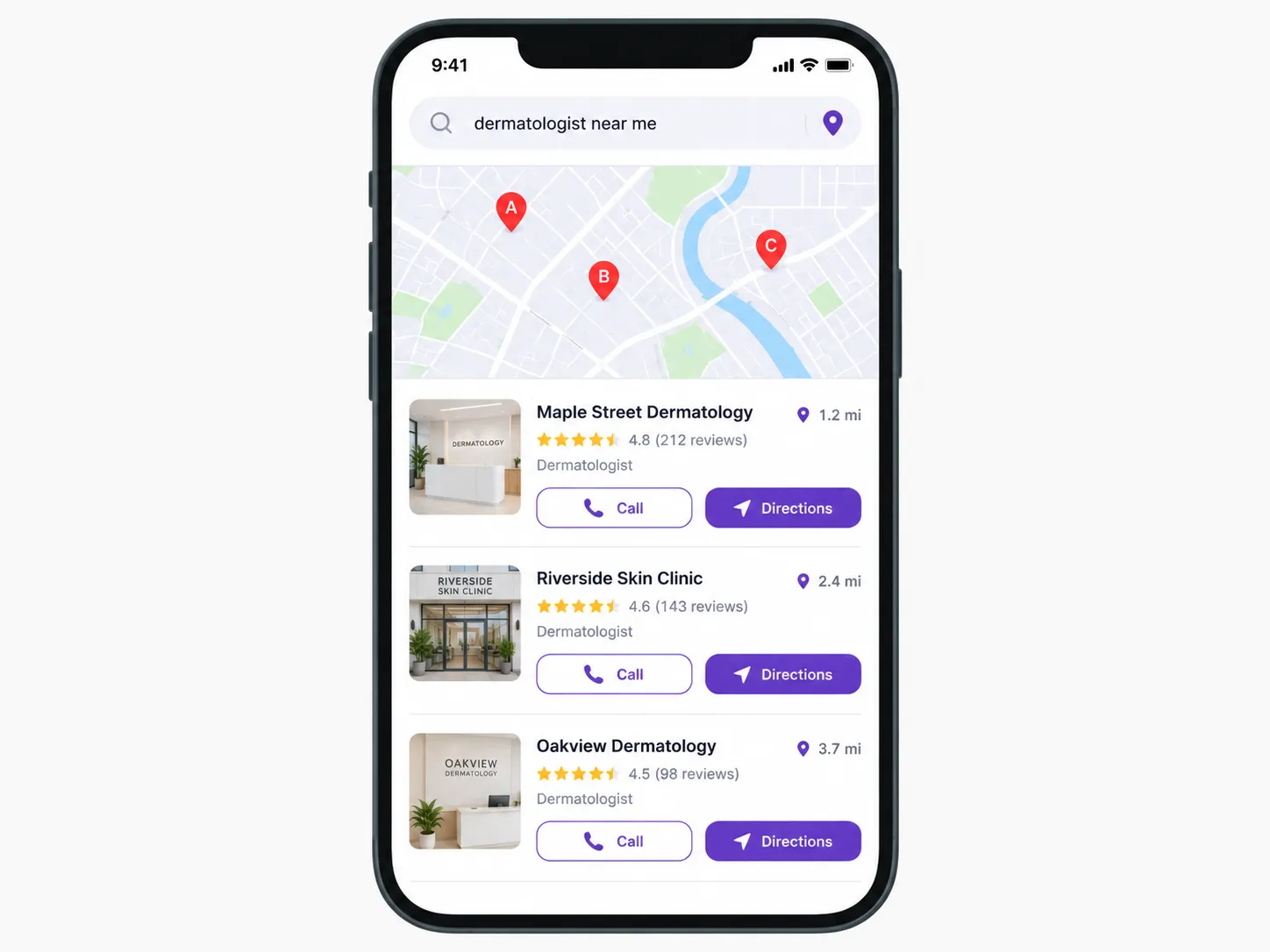
What the Map Pack shows a patient: rating, reviews, category and distance side by side. Illustrative example with a fictional practice and data.
Local SEO for doctors raises a common question: should each physician have their own listing? Google allows individual practitioners their own listing when they are public-facing at a real location.[2] That does not mean every doctor should have one. Extra profiles at the same address can split reviews and compete with the practice listing.
- Keep the practice listing as the main profile for each staffed location.
- Add a provider profile only when patients search for that doctor by name and the doctor sees patients at that address.
- Use the provider’s own name and a category that fits their specialty, not the practice’s.
- Clean up when someone leaves. Remove or transfer the profile and update your website.
Visiting consultants and multi-site providers are the messy cases. Check Google’s current guidelines before creating anything.
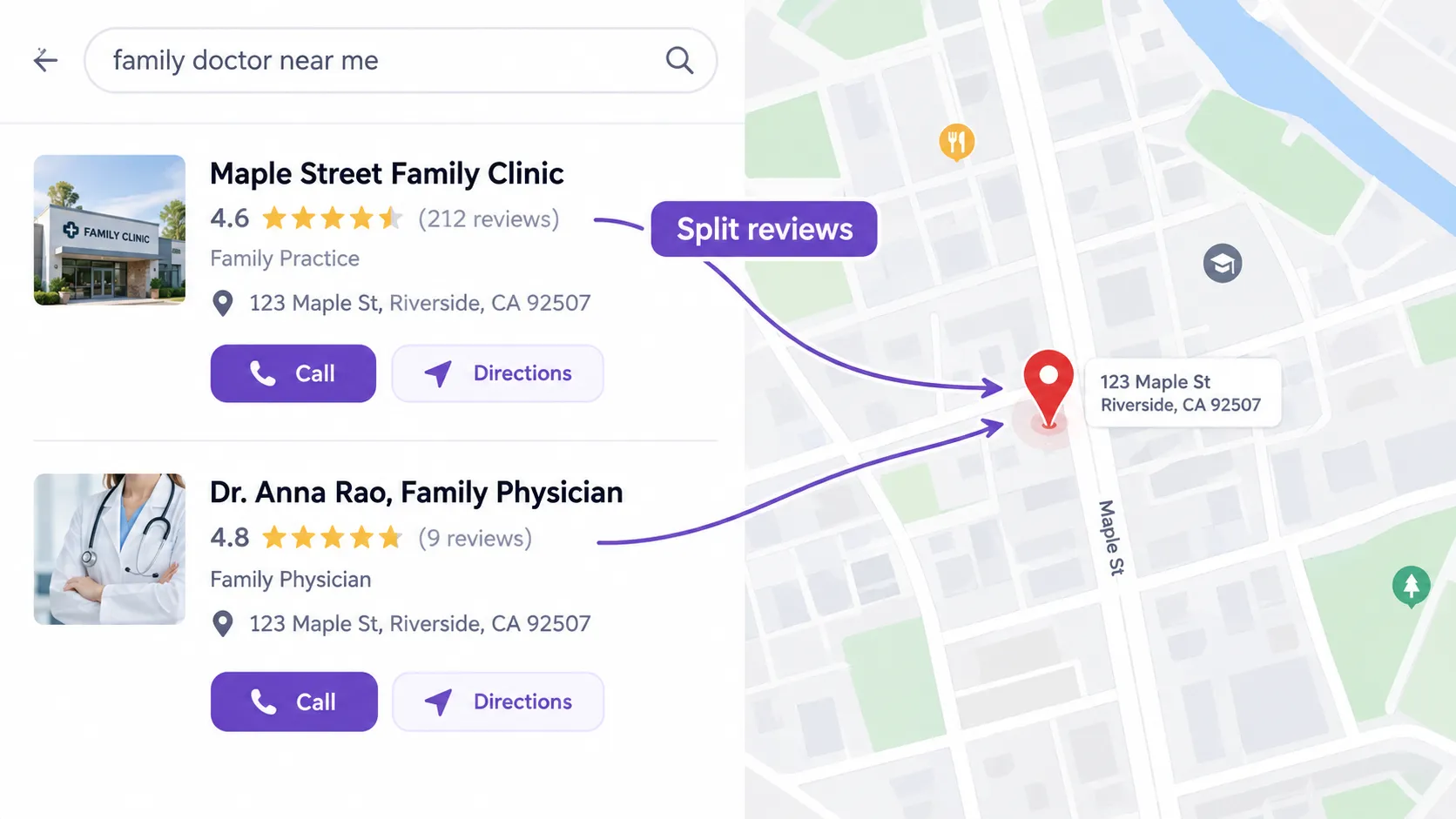
Two listings at one address can split reviews between the practice and the provider. Illustrative example with a fictional practice and data.
The messy cases
- VISITING OR MULTI-SITE PROVIDERS: give a provider a profile only where they keep regular, staffed hours at a public-facing location. Don’t create one per site unless each location qualifies under Google’s guidelines.[2]
- Hospital departments: default to the hospital’s listing. Consider a separate one only if the department is a distinct, staffed, public-facing location under Google’s rules.
- Telehealth-only providers: don’t use a virtual office or mailbox address to look local. Read Google’s address and service-area rules first.
- Duplicates: search your name and address in Google Maps. Report duplicate or closed listings for removal, and keep the surviving profile’s details accurate.
Reviews: how to ask and how to reply under HIPAA
HIPAA does not ban replying. It bans disclosing protected health information, and that includes confirming that the reviewer was a patient. One recent analysis flagged replies as problems when they merely acknowledged a care relationship.[3] OCR has settled with practices over replies on review sites, including New Vision Dental ($23,000) and Manasa Health Center ($30,000).[3] An earlier Texas dental case ended at $10,000.[4]
| If the review says… | Risky reply | Safer reply |
|---|---|---|
| Details of a procedure | “We’re glad your surgery went well.” | Generic thanks, no mention of care. |
| A complaint about billing | “Your insurance was billed correctly.” | Invite them to call the office. |
| A 5-star rave | “Thank you for trusting us with your care.” | “Thank you for taking the time to share feedback.” |
A reply you can adapt: “Thank you for taking the time to share your feedback. We take all feedback seriously. Because of privacy laws, we can’t discuss any individual’s details in a public forum. We’d welcome hearing from you directly at [phone or email].”
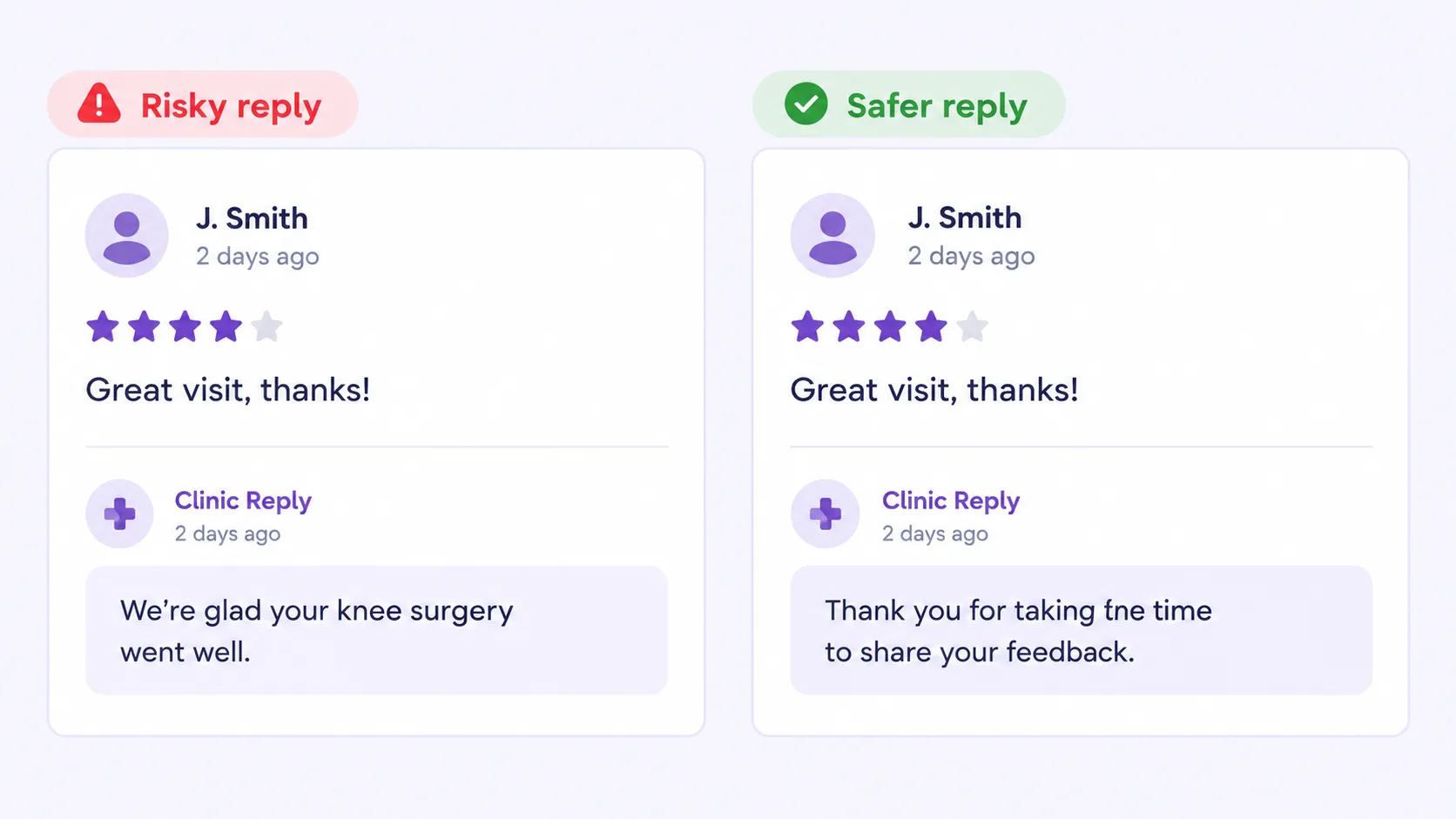
The same 4-star review, answered two ways: one confirms care, the other stays generic. Illustrative example with a fictional practice and data.
Harder review situations
| Situation | Do | Don’t |
|---|---|---|
| The review looks fake | Report it to Google from your profile. Reply generically, or not at all. | Accuse the reviewer or check their records to prove they weren’t a patient. |
| The reviewer names a doctor | Thank them generically and pass the feedback to the team internally. | Write “Dr. X was glad to treat you.” |
| The reviewer shares their own diagnosis | Use the same generic reply. | Repeat, confirm or build on what they disclosed. |
| A glowing review | Thank them generically. | Add “thank you for trusting us with your care.” |
Asking for reviews: ask every patient the same way, offer nothing in return, and never screen who gets the link. Google’s policies and the FTC’s 2024 review rule point the same way.[7] If you send requests by text, have counsel confirm consent rules.
Measuring results without creating a HIPAA problem
Local SEO for medical professionals still needs measurement, but analytics, ad pixels, call tracking and chat widgets can pass visitor data to outside vendors. HHS says regulated entities may not use tracking technology in ways that disclose protected health information, and its updated guidance narrowed some earlier language without changing that core point.[5] [6]
- List every tag on your site, especially on appointment and patient-portal pages.
- Ask each vendor whether it will sign a business associate agreement, and what data it collects.
- Prefer Google Business Profile performance data (calls, directions, website clicks) for local visibility.
- Keep one primary phone number public and consistent. Add tracking numbers as secondary.
- Ask your agency for a BAA if it touches patient data or replies to reviews for you.
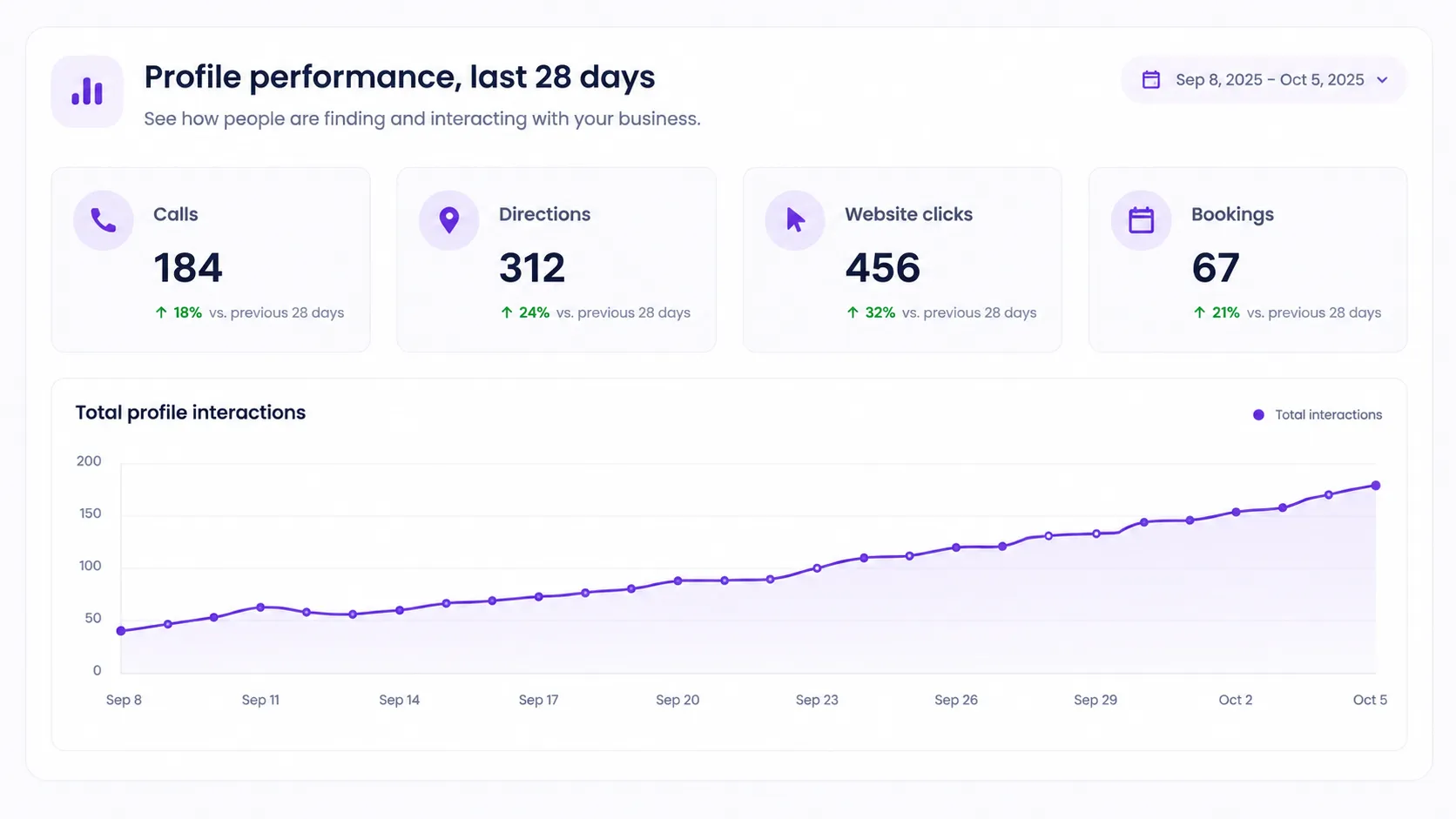
Business Profile performance data (calls, directions, website clicks) is a privacy-friendly way to track local visibility. Illustrative example with a fictional practice and data.
A vendor checklist before you measure
- Inventory. List every analytics tag, ad pixel, call-tracking number, chat widget and scheduling embed.
- Sort by page. Mark which run on public pages and which run on booking, intake or portal pages. The latter carry the most risk.
- Ask each vendor in writing whether it signs a BAA and what it collects. Don’t assume a popular tool will.
- Remove or restrict any tag you can’t cover, especially on booking and portal pages.
- Document the decision and have your privacy officer or counsel sign off.
- Re-check quarterly, since new tags appear whenever someone edits the site.
Directory and provider data
Patients, insurers and Google all read provider data from different places. Local SEO for medical practices depends on these sources agreeing with each other. Mismatches confuse patients even when they don’t move rankings, so audit each source against one master record.
| Source | What to check |
|---|---|
| Google, Apple, Bing | Name, address, phone, hours, categories. |
| Healthgrades, Zocdoc, Vitals, WebMD | Claim each provider profile and match specialty, location and insurance listed. |
| NPI Registry (NPPES) | Practice address, phone and taxonomy match your master record. |
| CAQH ProView | Practice locations are current. Insurers often draw directory data from here, so confirm with each payer. |
| Insurer directories | Address, phone and “accepting new patients” status. |
| State medical board lookup | License details and practice address. |
Patients also search by insurer (“dentist that takes Delta Dental”). List the plans you accept in plain text on a dedicated page. Treat this as a test, and check search volume for your market before investing.
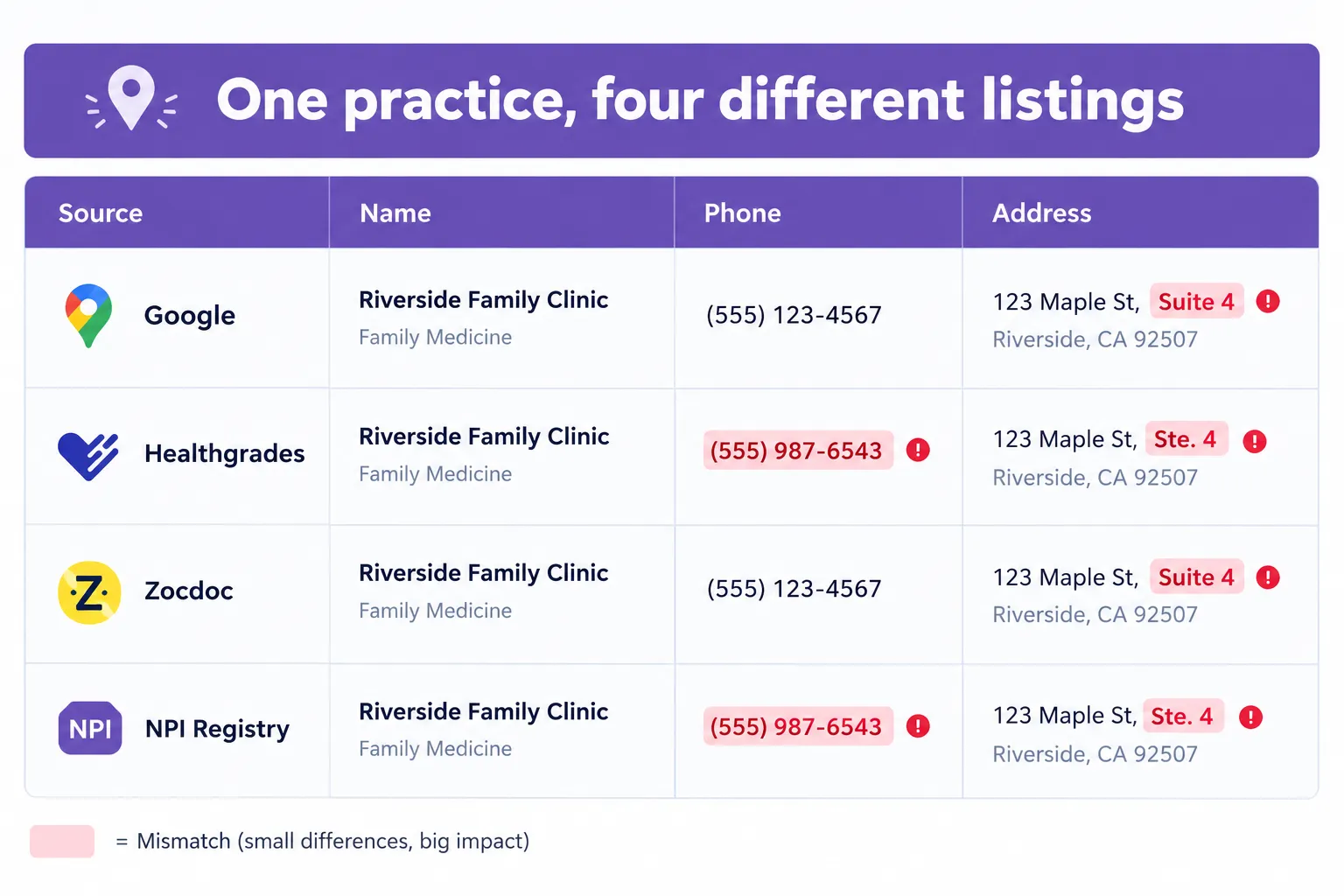
One practice, four different listings: small mismatches in phone and suite format add up. Illustrative example with a fictional practice and data.
Myth-check: claims we found, and what we can verify
| Claim in top-ranking pages | What we can verify |
|---|---|
| “Phone numbers don’t matter for NAP.” | Unproven either way. Keeping one primary number consistent costs nothing and avoids patient confusion. |
| “Post on your profile 20 times a month.” | The source cites its own review of 233 profiles with no method shown. Treat it as unproven. Post when you have something useful to say. |
| Fixed ranking-factor percentages (for example, profile 25%, reviews 16%) | Unsourced and dated. Google confirms only relevance, distance and prominence.[1] |
| “Social media posts boost local rankings.” | We found no Google statement supporting this. |
| “Add FAQ schema to win rich results.” | Google limited FAQ rich results to well-known government and health sites in 2023. Verify current status before relying on it. |
Schema example for a clinic and provider
Structured data helps search engines match your practice and providers to the right entities. For local SEO for doctors, it also ties each physician to the clinic where they practice. Use accurate, public business information only. Never put patient names, reviews from identifiable patients or health details in markup. This example uses fictional details.
{
“@context”: “https://schema.org”,
“@graph”: [
{“@type”: “MedicalClinic”, “@id”: “https://example.com/#clinic”,
“name”: “Example Family Clinic”, “url”: “https://example.com/”,
“telephone”: “+1-555-010-0100”,
“address”: {“@type”: “PostalAddress”, “streetAddress”: “100 Main St, Suite 4”,
“addressLocality”: “Dallas”, “addressRegion”: “TX”, “postalCode”: “75201”, “addressCountry”: “US”},
“openingHours”: “Mo-Fr 08:00-17:00”, “medicalSpecialty”: “Dermatology”},
{“@type”: “Physician”, “name”: “Dr. Jane Example”,
“medicalSpecialty”: “Dermatology”, “worksFor”: {“@id”: “https://example.com/#clinic”}}
]
}
A 90-day plan
Use this order if you are starting local SEO for healthcare from scratch, or tidying up a profile that has drifted.
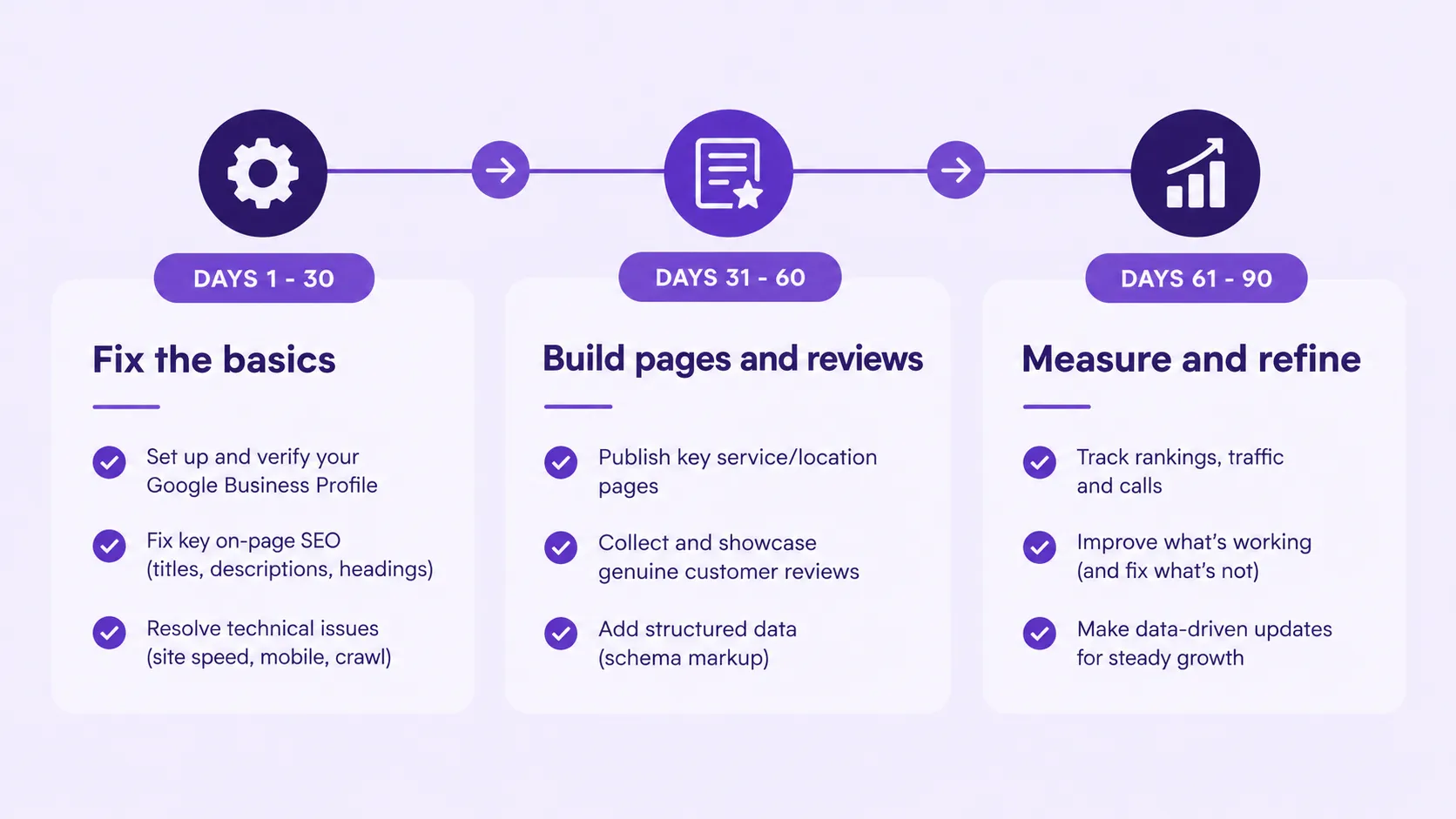
The 90-day plan at a glance. Illustrative example with a fictional practice and data.
| Days | Focus |
|---|---|
| 1–30 | Fix categories, hours and services. Decide provider listings. Audit tracking tags. Write the review-reply policy. |
| 31–60 | Build or improve service and location pages. Clean directory data. Start a steady review-request routine. |
| 61–90 | Review calls, directions and bookings. Fix gaps, then add content for the services patients ask about. |
Self-check: tick what's true for your practice
0 of 7 ticked
Your local SEO foundation needs attention. Start with your Google Business Profile, business information, service pages, and review process.
Local SEO for healthcare: FAQs
What is local SEO for healthcare?
Local SEO for healthcare is the work of making a practice, clinic or provider visible when nearby patients search for care, mainly in Google’s Map Pack, local organic results and AI answers. It covers your Google Business Profile, service and location pages, reviews, consistent directory data and safe measurement. Healthcare local SEO differs from other industries because privacy rules apply to reviews, tracking and listings.
Local SEO for healthcare is the work of making a practice, clinic or provider visible when nearby patients search for care, mainly in Google’s Map Pack, local organic results and AI answers. It covers your Google Business Profile, service and location pages, reviews, consistent directory data and safe measurement. Healthcare local SEO differs from other industries because privacy rules apply to reviews, tracking and listings.
Can I reply to a patient's Google review?
Yes, but the reply must not confirm the person is a patient or mention any care, visit, billing or insurance detail, even if the reviewer already shared it. Thank them generically and invite them to contact the office directly.
Yes, but the reply must not confirm the person is a patient or mention any care, visit, billing or insurance detail, even if the reviewer already shared it. Thank them generically and invite them to contact the office directly.
Do I need a separate Google profile for each provider?
Not always. A provider can have a listing if they are public-facing at a practice location, but multiple profiles at one address can compete. Decide per provider using Google’s current guidelines, and keep names and categories distinct.
Not always. A provider can have a listing if they are public-facing at a practice location, but multiple profiles at one address can compete. Decide per provider using Google’s current guidelines, and keep names and categories distinct.
Is Google Analytics safe to use on a healthcare website?
It depends on what the tool can collect and where it runs. HHS says regulated entities must not let tracking tools disclose protected health information to vendors. Review every tag with your privacy officer or counsel, and get a BAA where one is required.
It depends on what the tool can collect and where it runs. HHS says regulated entities must not let tracking tools disclose protected health information to vendors. Review every tag with your privacy officer or counsel, and get a BAA where one is required.
Should my tracking phone number replace my main number?
No. Keep one primary number consistent everywhere and add the tracking number as a secondary number, so patients and directories see stable data while you still measure calls.
No. Keep one primary number consistent everywhere and add the tracking number as a secondary number, so patients and directories see stable data while you still measure calls.
How long does local SEO take for a healthcare practice?
Profile and data corrections can show movement in weeks. Competitive specialties in large metros usually need several months of steady reviews, content and local mentions. Be wary of fixed-date promises.
Profile and data corrections can show movement in weeks. Competitive specialties in large metros usually need several months of steady reviews, content and local mentions. Be wary of fixed-date promises.
What should I do about a fake review?
Report it to Google from your profile. If you reply, keep it generic and don’t confirm or deny that the person was a patient, and don’t look up records to refute them.
Report it to Google from your profile. If you reply, keep it generic and don’t confirm or deny that the person was a patient, and don’t look up records to refute them.
Do I need a BAA with my SEO agency?
If the agency will access protected health information, or handle review replies or tracking in ways that involve it, you generally need a business associate agreement. Confirm with your counsel.
If the agency will access protected health information, or handle review replies or tracking in ways that involve it, you generally need a business associate agreement. Confirm with your counsel.

Rajiv Ranjan
CTO, UnoSearch
Rajiv Ranjan is the CTO of UnoSearch, leading the company’s technology, AI, and digital innovation initiatives. He focuses on building scalable technology solutions, integrating AI into business processes, and using data and automation to drive smarter, more efficient growth. His expertise spans technology strategy, AI solutions, marketing technology, and digital transformation.
10+ Years
of Expertise
60+
Industries Served
AI-First
Technology & Innovation
How we researched this
We reviewed the top-ranking US pages for this topic, then checked compliance points against HHS guidance, OCR settlements and Google’s help pages. This is marketing guidance, not legal advice. Have a HIPAA compliance professional or healthcare attorney review your own policies.
See where your practice stands
Get a local SEO audit for your healthcare practice, built on how your practice actually shows up today.
Map Pack, provider and practice listing review
Geo-grid ranking snapshot
HIPAA-safe review and reply check
Competitor comparison
Priority fix list
References
- Google Business Profile Help. “How to improve your local ranking on Google.” https://support.google.com/business/answer/7091
- Google Business Profile Help. “Guidelines for representing your business on Google.” https://support.google.com/business/answer/3038177
- HIPAA Journal. Study of healthcare review replies and HIPAA violations. https://www.hipaajournal.com/study-healthcare-review-replies-hipaa-violations/
- Baker Donelson. “Physicians, Think Before You Yelp.” https://bakerdonelson.com/physicians-think-before-you-yelp
- HHS Office for Civil Rights. Use of Online Tracking Technologies by HIPAA Covered Entities and Business Associates. https://www.hhs.gov/hipaa/for-professionals/privacy/guidance/hipaa-online-tracking/index.html
- Hogan Lovells. “Updated OCR guidance does not solve HIPAA’s tracker uncertainty.” https://www.hlc.com/en/publications/updated-ocr-guidance-does-not-solve-hipaas-tracker-uncertainty
- Morgan Lewis. “FTC Issues Final Rule on Consumer Reviews and Testimonials.” August 2024. https://www.morganlewis.com/pubs/2024/08/ftc-issues-final-rule-on-consumer-reviews-and-testimonials
Continue Learning About Digital Marketing

Link Building Cost in India: A Complete 2026 Pricing Guide
If you are budgeting for SEO, you need a clear answer on link building cost in India. This guide gives you real price ranges, the factors that move those prices, and a simple way to judge if a quote is fair. No guesswork, no filler. Just the numbers you need to plan...
PPC for Real Estate: How to Generate Better Leads (2026 Guide)
Real estate PPC can put your business in front of buyers and sellers at the exact moment they are searching for an agent, property, or real estate service. But simply paying for clicks does not guarantee quality leads. The difference comes down to targeting the right...

SEO for Real Estate: The Complete Guide to Ranking Higher and Winning More Listings
Most buyers and sellers of residential or commercial properties don't wake up looking for an agent. They start by Googling a neighborhood, a school zone, or "homes for sale near me." By the time they're ready to reach out, they've already noticed the same few names...
Consult Your Digital Marketing Expert Today!